Cricket / Tactics
Cricket/Tactics is Autodarts' second competitive mode alongside X01, described in-app as:
Hit and close specific numbers while stopping opponents from scoring.
Cricket/Tactics and X01 are currently the only modes with a built-in Bot opponent (multiple difficulty levels) — useful for practicing solo against some resistance.
How to play
Cricket/Tactics is a scoring darts game where the aim is to "close" a set of target numbers before your opponent does. Which numbers are in play depends on the Game Mode: Cricket targets 20 down to 15 plus the bull (the bullseye at the center of the board), Tactics widens that to 20 down to 10 plus the bull, and Hidden Cricket targets seven numbers drawn at random from the whole board — the bull might be one of them, but isn't guaranteed — kept hidden from all players until each one is hit for the first time.
A number is closed by collecting three marks on it. A single (the plain number segment) is worth one mark, a double (the narrow outer ring, worth double) is worth two marks, and a treble (the narrow inner ring, worth triple) is worth three marks. Once a player has three marks on a number, that number is closed for them — further hits on it just don't earn any more marks, since there's nothing left to close. A number stays open for scoring until every player in the match has closed it.
Scoring comes into play once a player has closed a number but at least one opponent hasn't: hitting that number again earns points equal to its value (e.g. 20 points for a single 20, 60 for a treble 20). In the default Standard scoring mode those points go to the player who hit it; the Cut Throat setting (see below) reverses this, adding the points to every opponent who hasn't closed that number instead. Either way, an opponent who hasn't closed the number yet doesn't score by hitting it themselves — they're still just collecting marks toward closing it.
The game continues until a player has closed all the target numbers for that Game Mode and has equal or more points than their opponent (in Cut Throat, that condition flips — the lowest score wins, since scoring there means handing points to opponents rather than collecting them). If they haven't yet met that points condition, they must continue scoring until they do, before they can win.
Settings
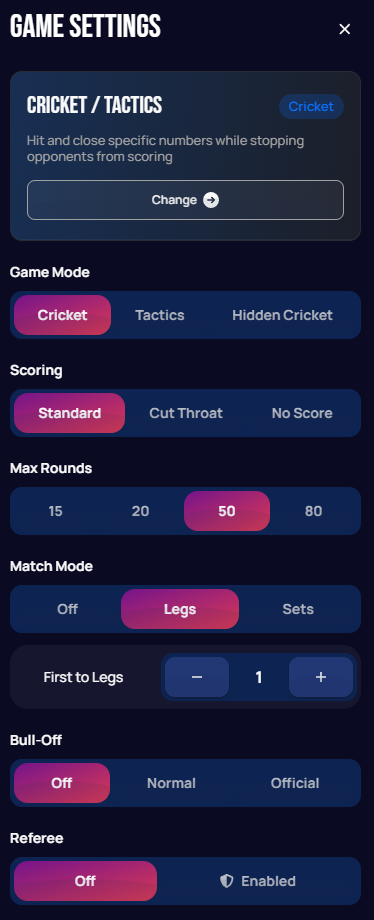
| Setting | Options | Notes |
|---|---|---|
| Game Mode | Cricket / Tactics / Hidden Cricket | Selects which numbers are targeted. Cricket uses 20 down to 15 plus the bull. Tactics widens the range to 20 down to 10 plus the bull. Hidden Cricket picks seven numbers at random from the whole board instead of a fixed range — the bull might be one of them, but isn't guaranteed — kept hidden from all players until each is first hit. |
| Scoring | Standard / Cut Throat / No Score | Standard scores as described above. Cut Throat flips scoring so hits on a number you've already closed add points to your opponents instead of yourself — and since you're handing out points instead of collecting them, the win condition flips too: the lowest score wins, not the highest. No Score removes scoring entirely — the game is won purely by closing all numbers first. |
| Max Rounds | 15 / 20 / 50 / 80 | Caps how many rounds a leg can run before ending, to prevent an unfinished leg running indefinitely. |
| Match Mode | Off / Legs / Sets | Whether the match is decided by a race to a number of legs (each leg is one complete game) or sets (a group of legs). With Off, there's no race target — after each leg, players choose either Finish (save the match stats) or Next Leg to keep playing; there's no cap on how many legs can be played this way, it's entirely up to the players. |
| First to (Legs/Sets) | Stepper, default 1 | How many legs (or sets) are needed to win the match. |
| Bull-Off | Off / Normal / Official | A bull-off decides who throws first: each player throws one dart at the bullseye, and whoever's closest (or hits it) goes first. Note this uses different option labels than X01's Bull-Off (WDF/PDC), for the same idea. |
| Referee | Off / Enabled | Only an Autodarts Plus member can switch this to Enabled, but it then applies to the whole lobby — players without Plus can be invited in and play with the referee too. Enabled disables manual score entry entirely: either player can call in Autodarts' AI via the robot button on the score row to review the darts thrown so far that turn (checkout darts, which bring a score to exactly zero, are reviewed automatically without being called), and a misread dart has to be challenged, with the challenge only sticking if your opponent confirms it too. Off means there's simply no referee, and you correct darts manually (see Playing Your First Game for how score corrections work) — except for Autodarts Plus members, who still see the robot button as a personal one-tap auto-correct even with Referee off, no challenge needed since you can just fix your own score. |
In-game view
The screenshots below are from a game against the Bot. The live layout adapts to your window size — wider windows list target numbers as rows with one column per player, while narrower windows flip to players as rows and numbers as columns so everything still fits:
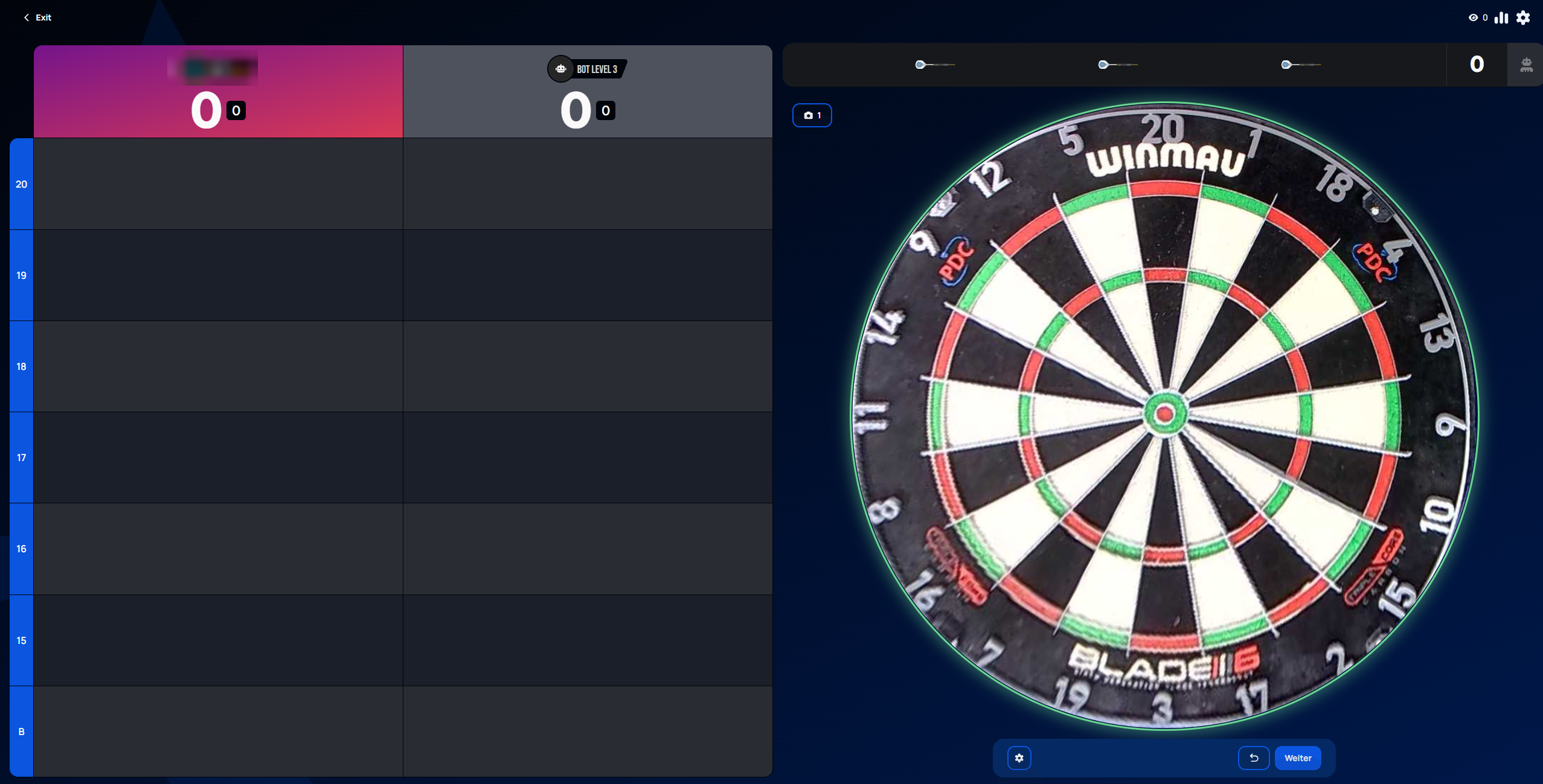 Personal data redacted
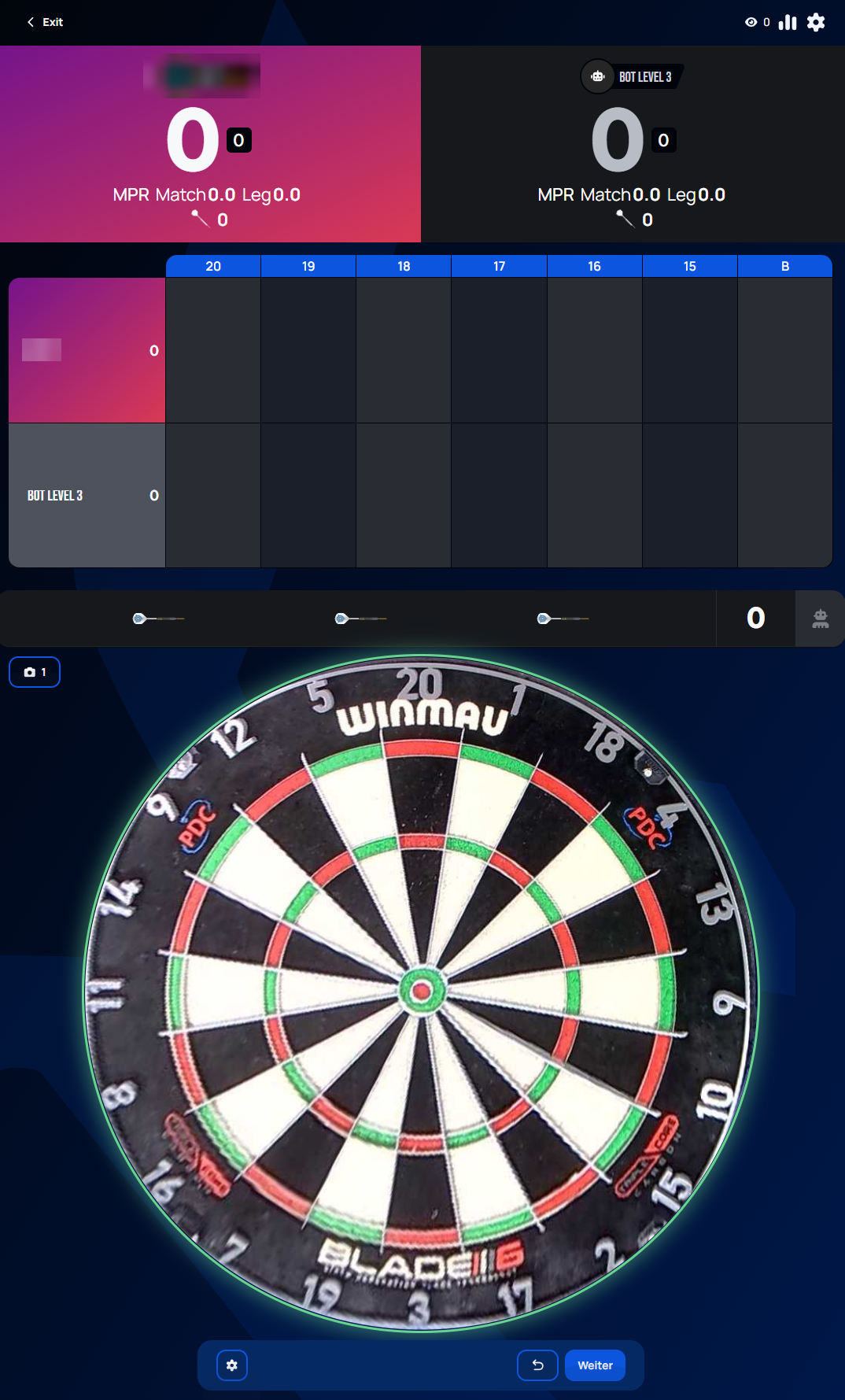 Personal data redacted
As the leg progresses, each hit is marked per player: a red mark means that number is closed for that player, and a green mark means it's closed and being scored against an opponent who hasn't closed it yet.
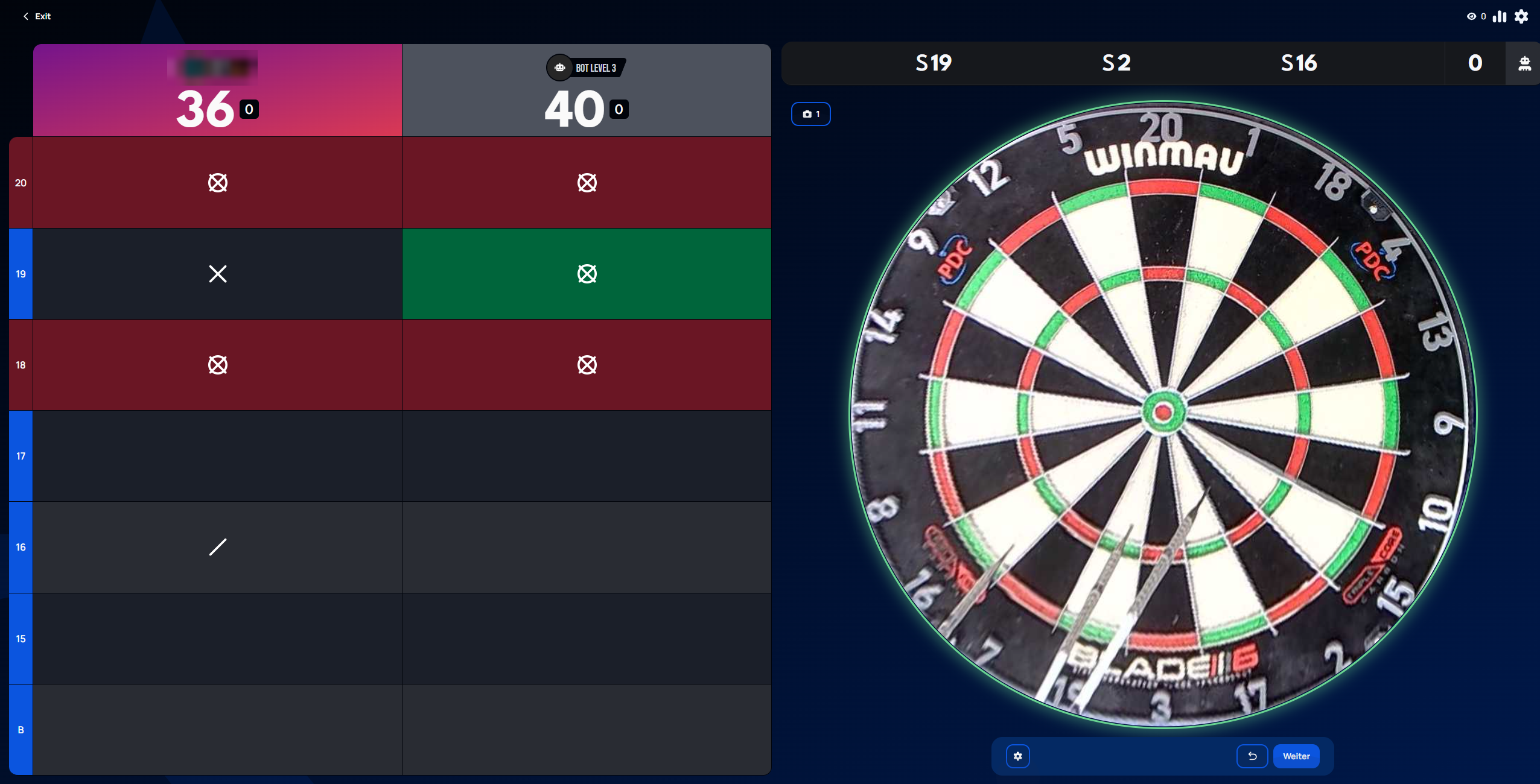 Personal data redacted
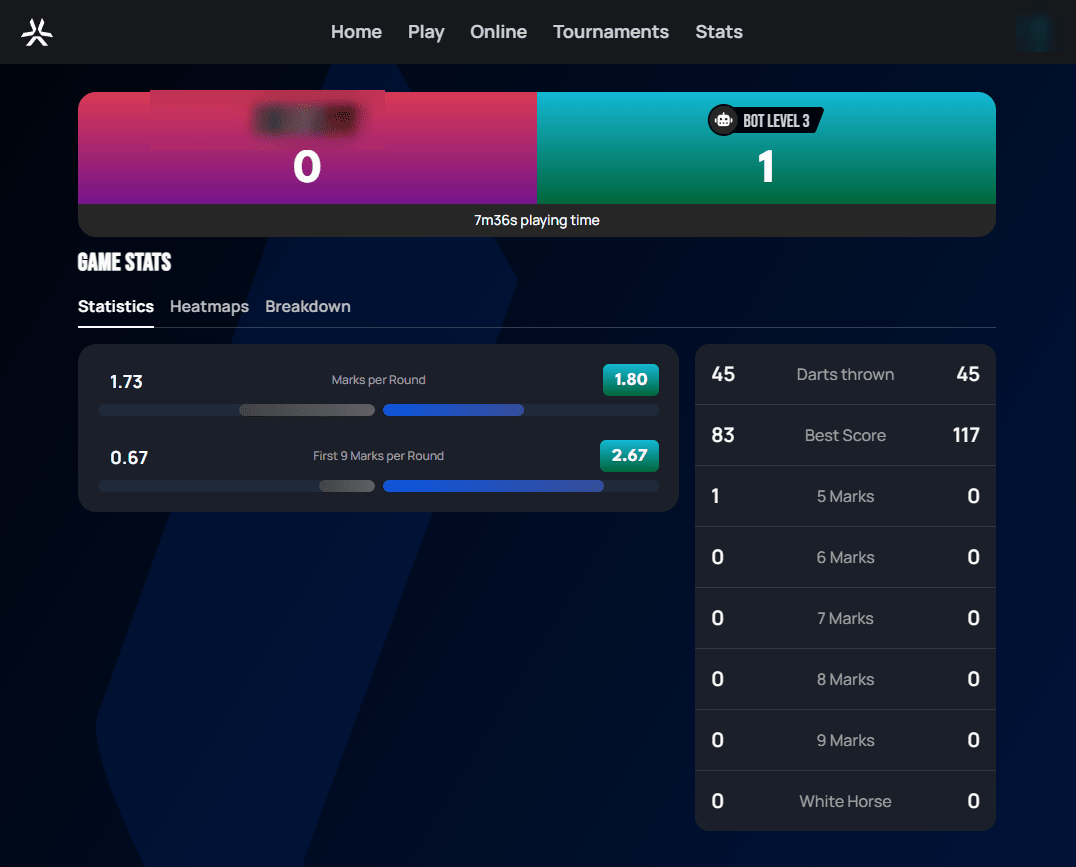
When the leg ends, a Game Stats panel summarizes the result, with Statistics, Heatmaps, and Breakdown tabs:
 Personal data redacted
Confusingly, this isn't named after the same thing on both sides of the Atlantic. The UK's own darts game called "Cricket" actually references the sport — bull worth two wickets, outer bull one, with "batting" and "bowling" turns — and is a completely different game from this one. What Autodarts (and most of the US) calls Cricket is what UK players call Tactics, and according to darts historian Patrick Chaplin, why Americans latched onto the name "Cricket" for it is genuinely unknown — even to people who've spent their careers documenting darts history.